Not another messaging app. A colleague who knows your clients.
Alfred is your business's memory: it knows who your clients are, what you told each other, where every job stands and how you write. With all this it prepares the day's work: replies, documents, follow-ups. You approve with one click.
Works with Gmail, WhatsApp Business, Google Calendar and your folders, on Drive or Dropbox too. On Mac; Windows coming.
It knows Marco's quote was waiting for exactly these measurements, and that you're free on Thursday at 9.
Your trade, your messages
Builders, craftsmen, car repair shops, agents, architects: see how Alfred handles a typical day. People and data are invented.
A small business needs a big memory
Messages come from five different places while you're on site, in the workshop, in the car or with a client. So this happens:
Before writing you a line, it asks itself eight questions
Alfred doesn't answer «at random» like a chatbot. It looks at everything your business knows about that client, and only then prepares something for you. Follow a voice note from arrival to archive, or tap a step.
Reads
Email, WhatsApp, voice notes, call transcripts: it transcribes and gathers.
Recognises
Who is writing, and which project it's about.
Remembers
Diary, quotes, promises, calendar.
Understands
What they ask, what they send, what changes.
Does it need a reply?
yes · preparesno · diary onlyWrites
In your style, with what it knows.
Can it do it alone?
no · suggests it to youyes · if you decided soActs and files
Send, calendar, diary, reminders.
 What Alfred is thinking
One single screen: what needs doing, already prepared
In «Today» you find the prepared replies, grouped by area, with the message received, the proposal and the reason. You correct them if needed and send them. Urgent ones at the top, follow-ups marked.
- Every proposal says why it's there.
- When you correct a text, Alfred learns your way of writing.
- With the keyboard, a few seconds per message are enough.
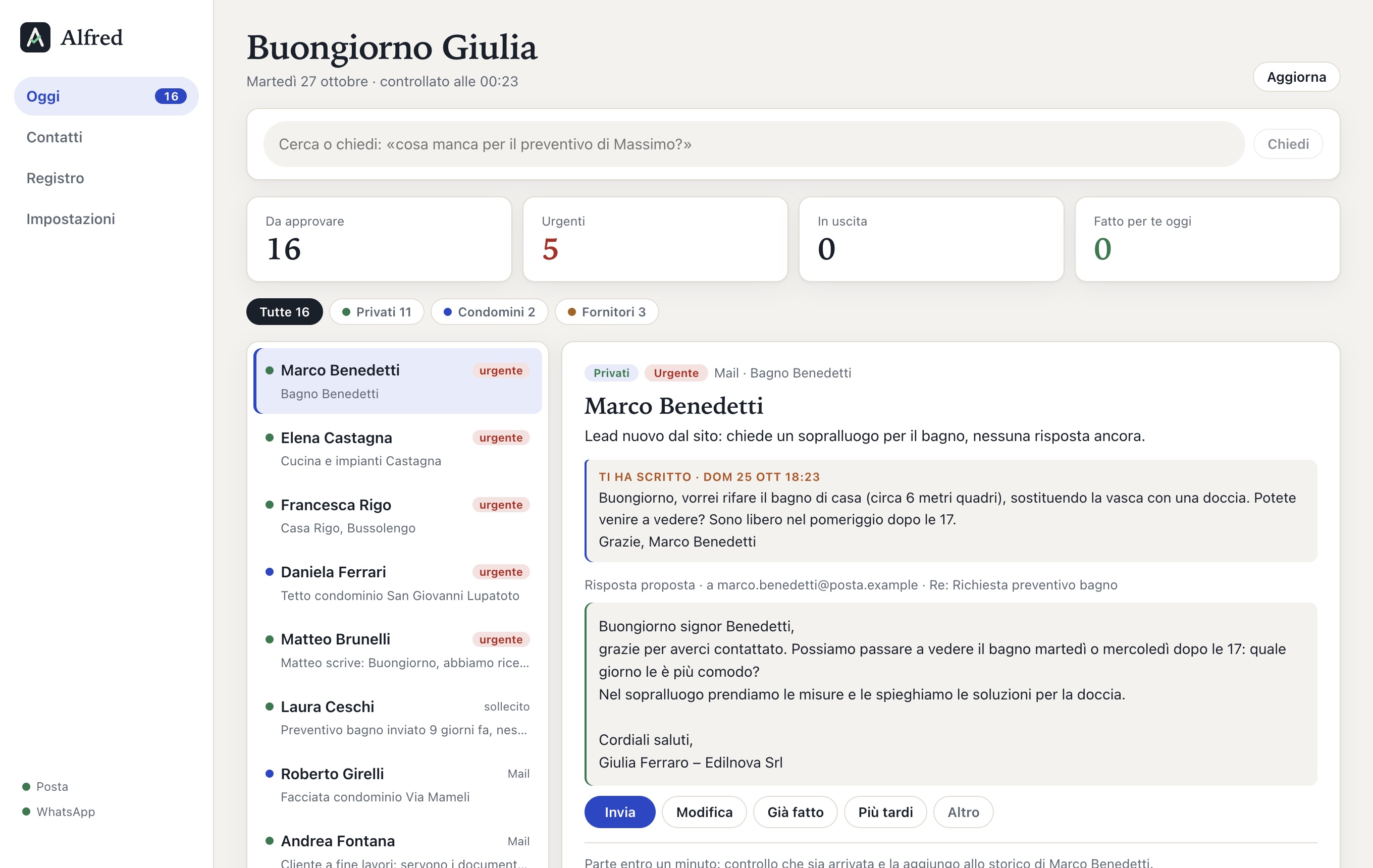
Alfred's «Today» screen, with sample data from an invented business.
Every client has their own folder, and their own history in date order
Emails, WhatsApp, voice notes and call transcripts go into the client's diary: the original words, what Alfred understood, the points to clarify. Attachments, photos and documents are saved in their folder. When something doesn't add up, you find who said what, and when, in a minute.
The archive lives on your computer and, if you like, also in the cloud (Google Drive or similar) as a backup. We decide the folder structure together.
How the archive works →Example with invented data.
You approve. Or we decide together what it can do alone.
At first Alfred only suggests. When you trust it, you switch on one by one the things it can do without asking. Everything stays written in the log.
Messages to clients and colleagues
Replies, follow-ups, documents: it prepares them, you read and approve them.
Routine tasks
The categories you choose, for example:
- confirmed appointments in the calendar
- «material received, thank you»
- reminder the day before
What you need to know
What changed, what's late, what didn't work. Never in silence.
After every call
From the call transcript, or from a two-minute voice note of yours, Alfred writes the summary, the next-steps document for the client and the messages to send.
Promises kept
«I'll send you the measurements on Friday»: that's a deadline. If they don't arrive, a polite follow-up is ready.
Ask Alfred, even by voice
«When am I free on Thursday?» «What's missing for the Rossi quote?» Type or speak: Alfred looks at calendar, chats, calls and plans, and answers you.
Let's see it on your cases
A 20-minute demo with a sample business. Then, if it convinces you, we start with your clients.
or write to info@alfredassistente.it